Verdict first
MiniMax Music 3 can produce sung songs locally on one RTX 4090 when it is run through the model’s intended SGLang-Omni serving path and called with the complete official Demo payload. That is the result that matters for a normal user who wants to know whether the model actually sings, rather than merely returning a valid audio file.
The works use the official Demo’s complete English lyrics and complete musical instruction. Every request used the official service model name, WAV output, max_new_tokens: 9000, and non-streaming mode. Seeds 7 through 12 produced outputs from 106.21 to 178.39 seconds, all stereo WAV files at 32 kHz. All six requests returned HTTP 200 and contained audible vocal output.
The practical verdict is positive but specific: this is a promising local song generator, not an exact-duration contract. The same lyrics and instructions can produce different lengths across seeds, so the generated file must be checked before it enters a video, podcast, game, or publishing workflow.
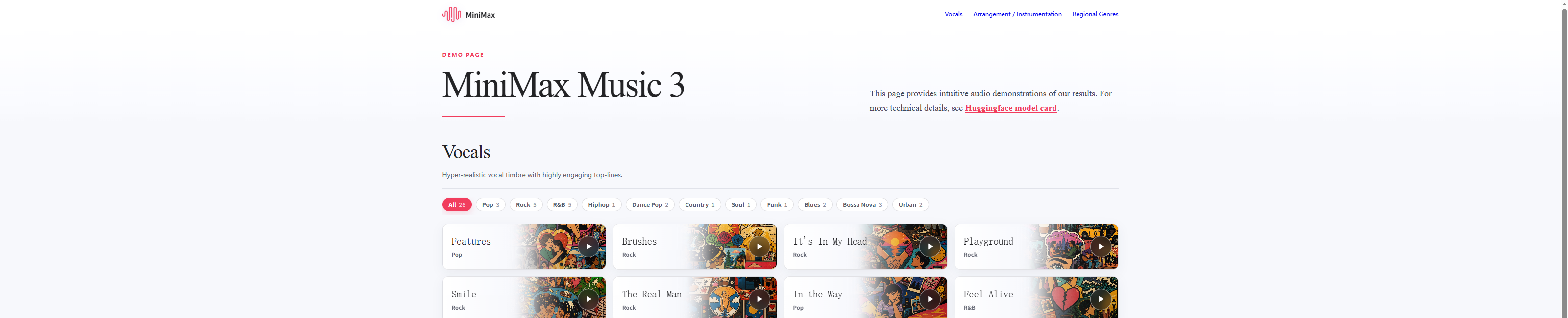
The screenshot is the official English-facing Demo reference. The audio files below are newly generated local artifacts from the deployed checkpoint.
Interpreting the audio result
A front end can silently omit part of the lyrics, truncate the instruction, map the instruction field incorrectly, skip the correct CFG pairing, or decode the audio tokens with the wrong component. A playable file is therefore not enough. For singing quality, the request contract and the acoustic decoding path must also match.
Official Demo evaluation
The official Demo song is a useful smoke test because it is longer and more structured than a two-line prompt. The lyrics contain several verses, repeated pre-choruses, a chorus, and a bridge. The instruction describes the genre, tempo, key, emotional progression, vocal character, backing vocals, effects, instruments, groove, and production space. This gives the model a realistic song-generation workload.
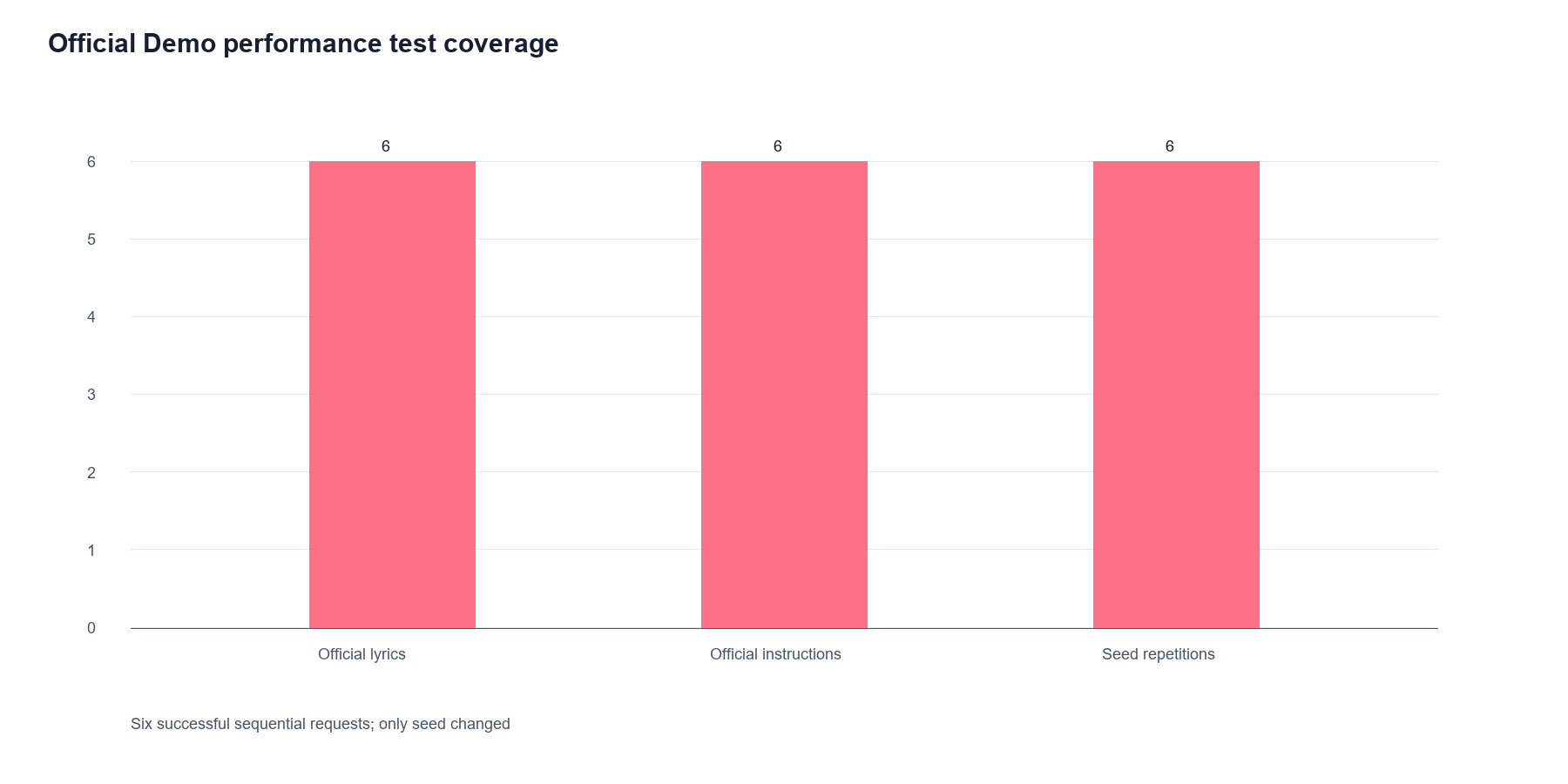
Each of the six local requests used the same payload except for the seed. No new lyrics were invented for the table, no short substitute chorus was inserted, and no custom genre prompt replaced the official instruction.
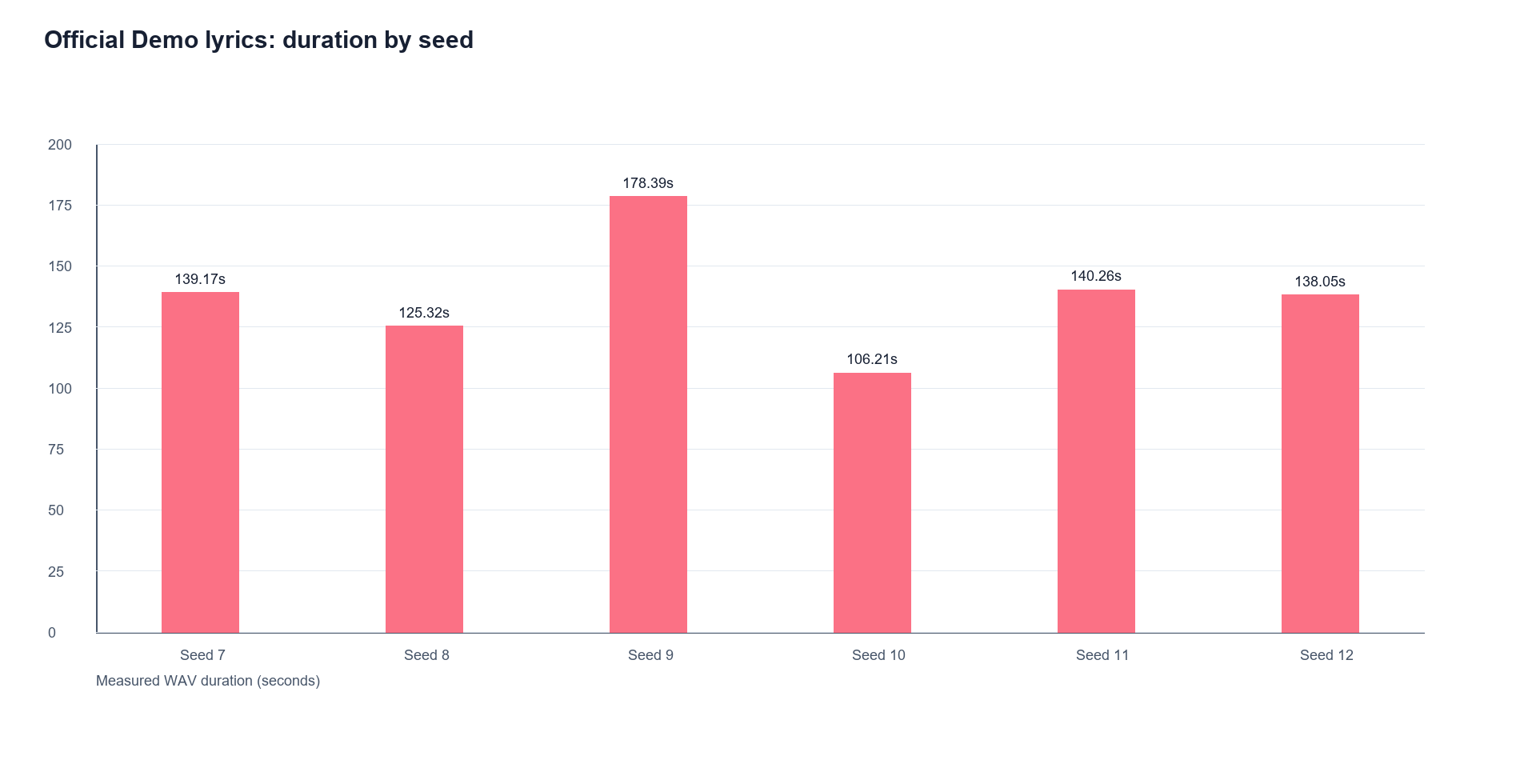
The output duration varied by seed, from 106.21 seconds for seed 10 to 178.39 seconds for seed 9. This is not a failure: all six files are substantial singing outputs. It is a limitation if a user expects the generation request to behave like a fixed-length audio-rendering command.
Works generated from the official Demo payload
These are local files generated from the same complete English lyrics and musical instructions shown on the official Demo page.
Work | Payload variation | Actual length | Audio |
|---|---|---|---|
Official Demo song | Official lyrics and instructions, seed 7 | 139.17 s | |
Official Demo song | Official lyrics and instructions, seed 8 | 125.32 s | |
Official Demo song | Official lyrics and instructions, seed 9 | 178.39 s | |
Official Demo song | Official lyrics and instructions, seed 10 | 106.21 s | |
Official Demo song | Official lyrics and instructions, seed 11 | 140.26 s | |
Official Demo song | Official lyrics and instructions, seed 12 | 138.05 s |
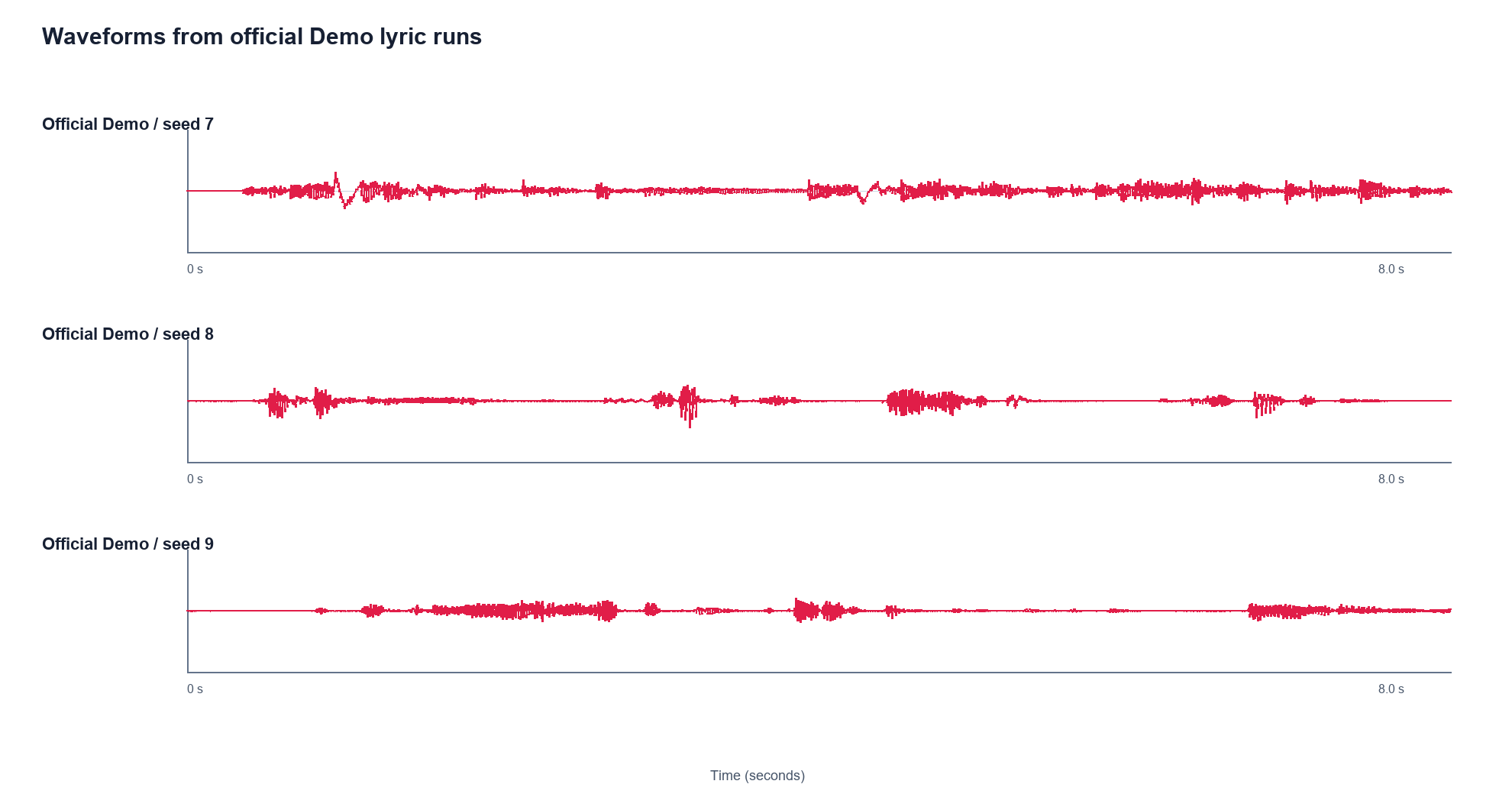
The three waveforms show that the outputs are not empty or silent containers. Waveform density is not a substitute for listening, but it is a useful first check that the generated artifacts contain sustained audio across the requested song material.
Inference time and resource consumption
The six requests were sent sequentially to one warm service. The timing includes the complete HTTP generation request and WAV write, not model startup:
Seed | Audio length | Total wall time | HTTP time | Peak VRAM | Max GPU utilization |
|---|---|---|---|---|---|
7 | 139.17 s | 240.97 s | 240.97 s | 40.5 GiB | 100% |
8 | 125.32 s | 217.57 s | 217.57 s | 40.5 GiB | 100% |
9 | 178.39 s | 312.10 s | 312.10 s | 40.5 GiB | 100% |
10 | 106.21 s | 289.66 s | 287.63 s | 40.284 GiB | 100% |
11 | 140.26 s | 359.16 s | 357.62 s | 40.286 GiB | 100% |
12 | 138.05 s | 240.71 s | 239.97 s | 40.286 GiB | 100% |
Across six official-Demo runs, the mean output length was 137.90 seconds and the median was 138.61 seconds. Mean wall time was 276.70 seconds and median wall time was 265.32 seconds. The service therefore took about 1.99 seconds of wall time per generated audio second on average, with a wide spread caused by seed-dependent generation length and token scheduling. The three instrumented runs used 40.284–40.286 GiB of GPU memory and reached 100% GPU utilization; no out-of-memory event occurred.
For a user, this means one song is a several-minute GPU job, not an instant preview. Keep the service warm when generating multiple takes, send requests sequentially on a 48 GiB card, and leave memory headroom for the operating system and any other GPU process. The measured peak is service-wide memory, not a guarantee that a different SGLang-Omni release, model layout, CUDA version, or concurrent workload will fit in the same amount.
What the six runs prove
The model can sing when the full contract is preserved
All six requests used non-empty lyrics and the complete musical instruction. All six produced stereo WAV artifacts with vocal content. This is stronger evidence than a short custom prompt because it exercises the long-form lyrics, repeated sections, bridge, and detailed production description used by the project’s own Demo.
The result does not prove perfect lyric pronunciation. Generative singing can compress syllables, repeat a phrase, blur consonants, or reinterpret a requested arrangement. Those are listening questions. The files are included so a reader can judge them directly rather than relying on a status code or a model-card claim.
Seed changes affect the rendered take
The seed is the only request-level variation in the six works. The different output lengths show that the model’s acoustic stopping behaviour is seed-dependent. In creative use this is useful: a user can keep the official lyrics and instruction fixed while trying another seed for a different take. In an editing workflow it means the application should read the actual WAV duration and should not assume that every take will line up automatically.
Detailed instructions are valuable, but they are directions
The official instruction is much more detailed than “make a pop song.” It describes a warm female vocal, a mid-tempo pop-rock/soul direction, arrangement growth, backing harmonies, guitar, bass, Rhodes, drums, bridge contrast, stereo width, and production effects. The service accepts this structured description as one instruction string and returns a coherent song artifact.
That does not turn every phrase into a hard symbolic constraint. “BPM 88,” a particular key, a three-part harmony, or a named instrument is a musical direction. A listener should check whether the beat feels close to the requested tempo, whether the vocal colour is apparent, and whether the arrangement evolves as described. The model is generative, not a deterministic multitrack workstation.
Exact duration is not guaranteed
The six outputs measured between 106.21 and 178.39 seconds with the same lyrics and instructions. This is enough to establish long-form generation, but not enough to promise an exact runtime. For a social post or a rough song idea, this is usually manageable. For a film cue, podcast intro, or game loop, the application should inspect the file, trim it, fade it, or choose another take before delivery.
When an integration produces weak vocals
An integration can return a valid audio file without using the same request and decoding path as the official SGLang-Omni example. The most likely failure modes are practical: a node may pass only a short prompt, omit the complete lyrics, map the instruction field incorrectly, skip the correct CFG pairing, or decode the audio tokens with the wrong component.
If a UI produces mostly background music, do not immediately conclude that MiniMax Music 3 cannot sing. First compare the UI’s request with the official payload. Confirm that the complete lyrics arrive at the model, that the full musical description is preserved, that the correct tokenizer and acoustic decoder are loaded, and that the output sample rate is handled correctly. If those checks cannot be made, the UI result is an integration test, not a fair model-quality test.
Runtime and hardware profile
Item | Verified result |
|---|---|
GPU | One NVIDIA RTX 4090-class GPU with about 48 GiB visible memory |
Runtime | SGLang-Omni 0.1.2 with SGLang 0.5.16 |
Model repository | Hugging Face |
Service model name |
|
Topology | Preprocessing/AR and DIT/DAV on GPU 0 |
Service peak | About 40.5 GiB observed during the one-GPU run |
Output | Stereo WAV, 32 kHz |
Requests | Sequential, non-streaming, one warm service |
Verified samples | 3 official-Demo payloads, seeds 7/8/9 |
The repository’s two-GPU example is a placement example, not a hard requirement for this tested topology. With only GPU 0 visible, the autoregressive stage and the DIT/DAV acoustic stage both run on GPU 0. A 48 GiB card has practical headroom in this configuration. A 24 GiB card should not be assumed to work without a separate memory test.
How single-GPU SGLang-Omni works
SGLang-Omni exposes one visible CUDA device through CUDA_VISIBLE_DEVICES=0. MiniMax Music 3 then places its logical stages on that device:
Stage | Placement | Role |
|---|---|---|
Preprocessing + AR | GPU 0 | Reads lyrics and instructions, then generates audio-token sequences |
DIT/DAV | GPU 0 | Converts the generated representation into waveform audio |
The official request fields remain unchanged. The one-GPU adjustment is hardware visibility plus a compatibility setting for the model’s classifier-free-guidance pair. Music 3 decodes conditioned and unconditioned rows together. An older scheduler path admitted only one row and failed with a paired-row error. The working engine builder allows the full pair through the microbatch: pp_max_micro_batch_size = 2 * max_running_requests.
This setting does not replace the lyrics, reduce max_new_tokens, or change the acoustic sampling request. It makes the runtime’s batch shape compatible with the model. If an older SGLang-Omni installation reports that conditioned and unconditioned rows must be paired but the batch has one row, update the runtime or apply the corresponding compatibility change before judging the model.
MiniMax Music 3 setup: correct request
Download the complete repository from Hugging Face, preserving its directory structure. The service needs the language-model files, Music tokenizer, flowmatching_vae.pth, dav.pth, and the service configuration. A partial directory is not sufficient.
hf download MiniMaxAI/MiniMax-Music3 --local-dir ./MiniMax-Music3
uv venv .venv
source .venv/bin/activate
uv pip install sglang-omni==0.1.2 sglang==0.5.16
CUDA_VISIBLE_DEVICES=0 sgl-omni serve

--model-path ./MiniMax-Music3

--port 8000
After the service reports that the MiniMax Music 3 pipeline is ready on one GPU, send the official request shape. Replace the two placeholders with the complete lyrics and complete instructions from the official Demo:
curl http://localhost:8000/v1/audio/speech

-H 'Content-Type: application/json'

-d '{
"model": "minimax_ttm",
"input": "<complete official Demo lyrics>",
"instructions": "<complete official Demo instructions>",
"response_format": "wav",
"seed": 7,
"max_new_tokens": 9000,
"stream": false
}'

--output minimax_music3.wav
The complete Demo lyrics matter. A short example is useful for checking that the endpoint responds, but it is not a substitute for the long-form official smoke test. Keep the lyrics non-empty, preserve the section labels, and do not replace the instruction with a generic genre word when evaluating singing quality.
What ordinary users should expect
MiniMax Music 3 is a good fit for local song sketches, lyric-to-song experiments, and arrangement exploration when the user has a large NVIDIA GPU and accepts a service-style setup. It is less convenient than a hosted editor: the user must manage the model files, runtime, memory, output metadata, and the final edit.
The strongest reason to try it is provenance. The user can keep the lyrics, instruction, seed, model revision, and generated WAV together. That makes a good take easier to revisit than a one-off browser result. The second reason is the long-form conditioning interface: the model is designed to receive both what should be sung and how the song should feel and develop.
The main cautions are duration variation, integration sensitivity, and the need for listening review. A valid API response is not a quality score. Before publishing, check lyric delivery, unwanted repetitions, vocal artifacts, clipping, loudness, actual duration, and whether the arrangement suits the intended use.
Capability profile
Capability | Evidence from this evaluation |
|---|---|
Full-song English lyrics | Verified with the complete official Demo lyrics |
Detailed musical instruction | Verified with the complete official Demo instruction |
Singing output | Six non-empty vocal WAV files |
Long-form generation | 106–178 seconds in six seed runs |
One-GPU serving | Verified on one RTX 4090-class GPU |
Exact duration | Not established; outputs varied by seed |
Concurrent serving | Not tested |
Instrumental-only generation | Not established by this singing evaluation |
Blind human quality score | Not claimed; files are provided for listening |
Rights and publishing
Use lyrics that you own or have permission to submit. Do not imitate an identifiable living singer without consent. Keep the prompt, seed, model version, and output provenance when a track will be distributed. A local checkpoint does not remove copyright, similarity, platform-disclosure, or Content ID obligations. Human review remains necessary before release.
Final scorecard
Dimension | Assessment |
|---|---|
Local installation | 3.5/5 — workable with a large GPU and pinned serving dependencies |
Single-GPU fit | 4/5 — verified on one 48 GiB RTX 4090-class card |
Singing path | 4/5 — complete official Demo requests produced vocal WAVs |
Prompt contract | 4/5 — lyrics and detailed instructions are both meaningful inputs |
Duration control | 3/5 — long outputs work, but exact length varies by seed |
Production readiness | 3/5 — useful for local creation, with concurrency and editing still to validate |
MiniMax Music 3 is worth trying if you want local English song generation and can run the official SGLang-Omni path. Use the complete Demo payload as the first quality test, keep the service topology explicit, and treat every generated duration as data to inspect rather than a promise.
A practical listening checklist
The three official-Demo works should be listened to as a small set of controlled takes. Start with the vocal itself. Ask whether the lead is present for the whole song, whether the words remain understandable in the verses, and whether the chorus becomes larger without turning into an unintelligible wall. The presence of a voice is only the first gate. A useful take should also preserve enough of the lyric identity that a listener can recognise the intended lines.
Next, listen for structure. The Demo lyric contains repeated pre-choruses and a bridge, so the arrangement should feel different when those sections arrive. A listener does not need to identify every boundary perfectly, but the song should not feel like one short loop copied for several minutes. Notice whether the intensity grows, whether the chorus returns with a meaningful change, and whether the bridge creates a contrast before the ending. These are better questions for a song model than simply asking whether the first ten seconds sound attractive.
Then check the musical direction. The official instruction asks for a warm female vocal, a pop-rock and soul colour, intimate verses, wider choruses, layered backing voices, guitar, bass, Rhodes, drums, and a supportive emotional arc. Listen for the overall impression rather than treating every noun as a guaranteed stem. A generative model may represent “Rhodes” as a soft keyboard colour, or may blend guitar and piano into a combined texture. Record what is clearly present, what is plausible, and what is missing. This makes a review useful without pretending that a natural-language instruction is a MIDI arrangement file.
Finally, check the artifact itself. Confirm that the file opens in the intended editor, has the expected number of channels, has a non-zero duration, and does not contain a truncated tail. Check the beginning and end for clicks, abrupt cut-offs, or several seconds of silence. Read the actual sample rate from the file rather than assuming that every Music 3 runtime exports the same rate. In this SGLang-Omni evaluation the files were 32 kHz stereo WAVs; a downstream system should still inspect metadata instead of hard-coding that value.
Common user questions
Is one RTX 4090 enough?
For the tested topology, yes. One 48 GiB RTX 4090-class GPU hosted the preprocessing/AR stage and the DIT/DAV acoustic stage. The observed service peak was about 40.5 GiB. This leaves useful headroom on the tested machine, but it is not a promise for a 24 GiB card, a laptop GPU, a machine with other resident CUDA processes, or a different runtime build.
Why does the repository show two GPUs?
The repository’s example shows a convenient way to place stages across two devices. It does not establish that two devices are mandatory. The verified single-card layout makes GPU 0 the only visible CUDA device, then places both logical generation stages there. The trade-off is memory pressure and lower capacity for concurrent requests. For one user generating one song at a time, the topology is workable.
Why is the official Demo payload important?
It removes a common source of confusion. A short custom lyric and a one-line genre prompt may be accepted by an endpoint, but they do not exercise the long-form lyric structure and detailed instruction that the project showcases. The complete Demo payload is a reproducible baseline. Once that baseline works, a user can shorten the lyrics or change the musical direction and know which part of the workflow changed.
What should I do if the output has no voice?
First, confirm that the full lyrics were sent as the input field and that they were not truncated by a UI text box. Confirm that the full instructions were sent as instructions, not as an unsupported alternate field. Confirm that the Music tokenizer and acoustic decoder belong to the same checkpoint layout. Then compare the request and the server log with the official SGLang-Omni path. If the request is materially different, fix the integration before judging the model. If the exact official request still produces a weak vocal result, save the payload, seed, log, and WAV as a reproducible issue report.
Can I request an exact song length?
The six official-Demo runs do not establish an exact-length guarantee. They demonstrate long outputs, but the actual lengths vary with seed. Treat a length setting as a generation budget or upper bound until a particular runtime has been tested with a duration acceptance rule. If a production slot is fixed, measure the result and use editing, padding, trimming, or a different take.
Can I use the audio commercially?
The answer depends on the current model license, the lyrics rights, the intended distribution, and any platform policy. Local execution does not automatically grant rights to lyrics or remove similarity concerns. Use text you own or have permission to use, avoid asking for an identifiable living singer’s voice, and retain the model version, seed, prompt, and output record. Obtain the necessary legal review before release.
Reproducibility record
The reproducible reference is the complete official Demo request. The stable fields are model: minimax_ttm, response_format: wav, max_new_tokens: 9000, and stream: false. The lyrics and instructions are the exact full strings from the official Demo payload. The generated works are stored under official_demo_samples_20260820 and are named by seed. Their durations are read from the WAV headers, not inferred from elapsed time or token counts.
The service was kept warm between requests and the requests were sent sequentially. The reported wall-clock times were approximately 241 seconds for seed 7, 218 seconds for seed 8, and 312 seconds for seed 9. These are end-to-end service timings for the long official Demo song on the tested server, not a general speed guarantee. Startup time, storage speed, CPU contention, CUDA kernels, and future serving versions can change the result. The useful performance conclusion is that one card can finish the job; it is not that a finished song arrives in a few seconds.
This also explains why a single “seconds per song” benchmark would be misleading. The three outputs have different acoustic lengths and different generation times. A fair comparison should report the input payload, seed, output duration, total wall-clock time, warm or cold state, GPU model, and whether the measurement includes file writing. Without those fields, two apparently different speed numbers may describe different workloads.